
Direct printing from your iPhone/iPad without PC
Overview
ePrint allows you to print directly from your iPhone/iPad, If the printer is on the supported list.
ePrint can set printer settings such as paper size, print color.
Not only for document, but also Photo, Contacts you can print it to your printer.
Preview is availabel before printing too.
ePrint Free is the trial version for free. Please try the functions of ePrint.

Please refer to the "Supported Printer List" page for which printer ePrint works or not.
ePrint is universal app, it works on both iPhone and iPad.
Before you print at ePrint, you need to add your printer to ePrrint. And it is recommended to add the printer again after you updete ePrint.
iPad

Fully compatible with iPad
ePrint on iPad
On iPad the preview is displayed in full screen, and works on multitasking mode with split screen.
Media
-
Nikkei BP Net
Nobuo Hayashi Long And Winding Mac
-
ASCII.jp
“ePrint Ver.2.0” to print images directly from iPhone
-
My Comi Journal
“ePrint” that allows you to print directly from your iPhone to “Kalario” via wireless LAN – Supports LIPS and PCL
-
PC Watch
Kazuhisa Nishikawa’s irregular column
Epson “EP-802A”, an inkjet multifunction device with improved usability
-
Gizmode Japan
Which is good? Find the best buy for iPhone print apps
Features
Print contents
You can print the following contents.
Contacts
Camera
Albums
Web
Note
Photo calender
Photo card
Clipboard
Mail (IMAP) *POP mail format is not supported.
Printing Settings
Various print settings are available.
(Settings vary depending on the print target.)
Color and monochrome switching
Duplex setting
Sepia printing
Paper size specification (A4/Letter/A3/A5/B4/B5/HLT/Lagal/L/2L/KG/Postcard/6-sheet...)
Orientation
Print Preview
Paper Type
Print Quality
Printer registration
Add a printer to the app by either of the following ways.
Enter IP address
Bonjour
Shared Printer Mac OS10.2 or later) (not available at ePrint Free)
Consumables display
Show supply information of the printer, if it is available.
Tips
Here are some tips to make ePrint more
-
Tips1:
It is recommended to re-add a printer when ePrint is updated.
Supply information will be turn to be shown or paper size list will be changed, because we are adding supported printer and improving the way of communicating with printer. -
Tips2:
Printed image may be changed when printing image or PDF in Web Printing
If print image or PDF via Web link, ePrint may change the layout. So the result may change from you see in the browser. Please check the preview before printing. -
Tips3:
In web printing you can save the linked image or PDF before printing. And it can be used offline.
To save the linked image or PDF, show them and press the + button in the screen and select "Save File" . Then set the file name in the dialog opened.
To open the saved file, tap the folder icon right side of bookmark icon, select the file in the next screen. -
Tips4:
Web printing consume a lot of memory.
When you see the alert about it, please change the resolution of contents at the print settings. -
Tips5:
Date/Time stamp of taking photo
Date stamp or Time stamp switch in the settings of ePrint is for setting the date or time at the image when you take a photo via Camera mode of ePrint.
The image will be save to the Camera Roll of iPhone with date or time. -
Tips6:Printing POP mail (iPhone OS 3.0 and above)
To print a POP email, open the Mail application, copy the body of the email, and paste it into ePrint's "Memo".
Paste it into ePrint's "Memo". -
Tips7:
Printing camera shots, web printing, and printing large images consume a lot of memory.
When you see the alert about it, please change the print resolution at the settings of ePrint or restart your iPhone/iPad and try again. -
Tips8:
You can set the page number when you print at the menu shown as 1/3 and so on in the ePrint screen
Support Printer List
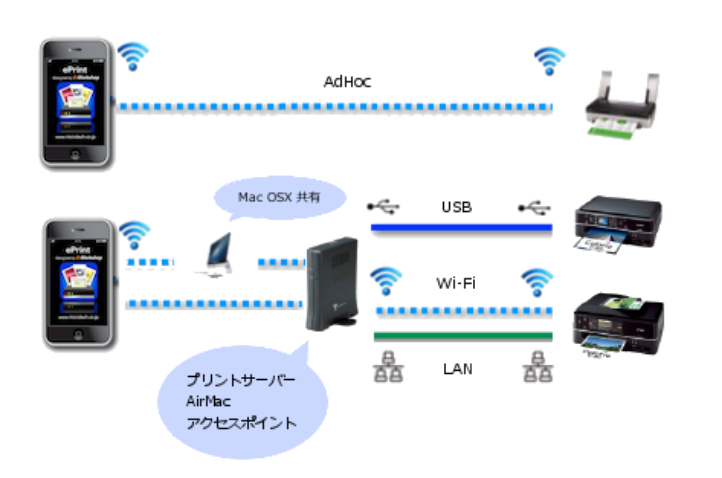
Supported Printer * Printer connected to the WiFi network, directly or via WiFi router as Print Server * Printer has the following PDL, Printer Description Language EPSON: ESC/P-R (except for ESC/P raster), ESC/Page, ESC/Page-Color, ESC/Page-S(Color only) HP: PCL3GUI, PCL (Except for HostBase model) Canon: LIPS4 (Except LIPS LX) OKI Data: PCL, PostScript TOSHIBA: PCL, PS3 RICHO: PCL, PS3 Casio: CPDL/Page (Except for V Series、B Series) KYOCERA: PCL, PS3 Savin: PCL, PS3" Lanier: PCL, PS3" nashuatec / Rex-Rotary / Gestetner Printer & MFP: PCL, PS3" Infotec MFP: PCL, PS3" Other Page Printer Vendor (brother, Samsung, Lexmark and other): LIPS (Except for CAPT)/PCL, PostScript Other Inkjet Printer Vendoer (Canon, brother, Samsung, Lexmark and other): Not supported
-
Epson Printers & MFPs
- Supported printer languages: ESC/P-R (excluding ESC/P raster), ESC/Page, ESC/Page-Color, ESC/Page-S (color only)
-
HP Printers & MFPs
- Supported printer languages: PCL3GUI, PCL (except HostBase)
-
Canon Page Printers & MFPs
- Supported printer languages: LIPS4 (except LIPS LX)
-
OKI Data Printers & MFPs
- Printer languages supported: PCL, PostScript
-
TOHSHIBA Printers & MFPs
- Supported printer languages: PCL,PS3
-
Ricoh Printers & MFPs
- Printer languages supported: PCL, PS3
-
Casio page printer
- Supported printer language: cpdl/page (except V series and B series)
-
KYOCERA Document Solutions Printers & MFPs
- Printer languages supported: PCL, PS3
-
Page printers from other manufacturers (e.g., Brother, Samsung, Lexmark)
- Printer languages supported: LIPS (except CAPT), PCL, PostScript
-
Inkjet printers from other manufacturers (Canon, brother, Samsung, Lexmark, etc.)
- Not supported
-
Shared Printer by Mac
ePrint can print with any printer, if the printer is published as Mac shared printer at the System Preferences. However it is available at not ePrint Free but ePrint.
-
If you are using HP ink-jet printer and see the alert "Faild to get printer control command", please set PDL to "PCL3GUI" and set Port to "Port9100", when you add printer at ePrint.
How to use
[Add Printer] sample video
[Camera print] sample video
[Album Print] sample video
[Note print] sample video
[Contacts print] sample video
FAQ
-
QWhich printer is available at ePrint
APlease check the supported printer list below. And ePrint can print at the printer which is network printer or network connected printer with the following protocol and PDL.
Print Port (Printing Protocol): LPR or Port9100
PDL (Printer Discription Language): ESC/P-R, ESC/Page, ESC/Page-Color, ESC/Page-S, PCL3GUI, PCL, PostScript, PS3, LIPS4, CPDL/Page -
QCan it be used with inkjet printers?
AePrint can print with most of EPSON Inkjet Printers and HP Inkjet Printers. And ePrint can print with any printers, if the printer is publised as Mac Shared Printer.
Please check the supported printer list below. -
QHow to know IP address of my printer?
APlease see the manual of the printer or WiFi router, if it is a network printer.
If the printer is shown in the printer list of ePrint, please tap the Bonjour button. -
QWhat kind of functions can be changed in the print settings of ePrint?
AColor and B&W switching
Borderless/Borderless setting
Paper type
Print quality
Duplex setting
Sepia printing
Paper size specification
Orientation
Print Preview
Please note that some functions are depend on the printer itself. -
QWhat functions do print settings contain?
AWhat kind of paper size is available?
-A3
-A4
-A5
-B4
-B5
-HLT
-Letter
-Legal
-L
-2L
-KG
-Postcard
Please note that available paper sizes are depent on printer itself. -
QIs it able to change paper size default?
AYes, default paper size is set printer settings. Please tap settings on the main screen, then chose paper size in the default paper size column.
Manual
ePrint Manual File(JapaneseOnly.)
You can download the ePrint manual (PDF file).
Purchase apps from the App Store
Please click the following icon to open App Store app.
Click here for a feature comparison chart between ePrint and ePrint Free.
Please confirm printing in your environment with ePrint Free [free of charge] before purchase.
For inquiries about ePrint, click here.